The past few weeks have been a very interesting learning curve for me, trying to dive deeper into the Agentic AI world.
I signed up for the Huggingface AI Agent Course from the beginning, super excited to get a grip on what was announced to be the greatest trend in 2025, to learn how to create my own agents, and to uncover the RAG hype around it.
I remember being so excited learning weekly, waiting for the weekly course release and complete the assignments, as if I’m in school again. And in the end, I did managed to create a general AI assistant and evaluated it on a proper AI benchmark for its capabilities.
Graduated from the course, I had so many ideas for my next agent projects, believing that the tools and frameworks (LangChain, LlamaIndex, Langgraph) I learned were all the latest things that I ever needed to know to implement a high-quality solution. With that in mind, I sat down, carefully spent hours reading API documentations to manually implement tools for the agent.
Until I discovered the existence of MCP, which, surprisingly, was not mentioned in the course.
This helped me to provide all the tools I needed for my agent (in my case, functions using Notion API) in literally minutes, which just put my previous hours of API reading and code implementation to dust. It was the fact that it was as simple as plugging in a USB to the Agent that blew my mind. And, with some research, I can see a growing base of companies providing their own standardized MCPs for their applications, which made me wonder if the LllamaIndex hub and Langchain tools that I freshly learned from the course would still remain useful, or would become obsolete soon. With this speed of innovation, things can become obsolete very quickly, while many other technologies have yet to emerge fully (VLM, for example). This made me wonder: “Is it too soon, or too late, to learn about AI?”
Through this, I realized how passive and ineffective my learning was, relying on a single source of truth and just waiting for the course to be delivered to me. By the time I finish the course, 2 months went by, while during that time, so many innovations and new releases have already been made (Google ADK, A2A, etc…), and so many missed learning opportunities and time pass by. Had I just decided to dive deeper myself, following the latest blogs and updates on different platforms (X, LinkedIn, news, conferences, etc ), and try to implement quality projects myself with the tools I learned, I would have made much more significant progress.
Don’t get me wrong, I believe the course is still a good starting point, providing very solid foundations about Agents, Tools, and how agent frameworks are normally structured, which later helped me get used to GoogleADK very quickly.
I just thought my approach to learning and development, especially in this time of rapid innovations and breakthroughs in this field, could be much better.
That’s enough for the quick learning reflection. The main goal of this blog is to cover all the main concepts that I have learned about MCPs, which has allowed me to implement my first MCP server that allows agents to interact with PowerBI to create dashboards, get and analyze data from PowerBI service, and more: https://github.com/pkduongsu/powerbi-mcp-server
Let’s get started!
Definition
Model Context Protocol (MCP) is an open protocol to standardize the way applications provide context to LLM, in other words, connecting AI models to different data sources and tools.
Why?
- Helps simplify the process of building agents and workflows on top of LLM, as they frequently need to integrate with data and tools to deliver real-world impact.
- MCP: More and more pre-built integrations of applications are being built that your LLM can just directly plug into and use all the tools (Ex: Notion).
- Flexibility to switch between LLM providers/vendors.
- Best practice for securing data within the infrastructure.
Core Concepts:
MCP servers provide 3 main types of capabilities:
- Resources: file-like data that can be read by clients (like api responses/file contents)
- Tools: Functions that can be called by LLM (with the user’s approval)
- Prompts: pre-written templates that help users accomplish specific tasks.
Architecture
- Follows a Client-Server architecture: a host application can connect to multiple servers:
- MCP Hosts: Programs (IDEs, Claude Desktop, or AI tools that wants to access data through MCP)
- MCP Clients: Protocol client that maintains 1:1 connection with servers.
- MCP Servers: Programs that expose specific capabilities through standardized protocol.
- Local Data Source: local filessystems, database, services that MCP servers can securely access.
- Remote service: external system available through internet (Ex: API) that MCP servers can connect to.
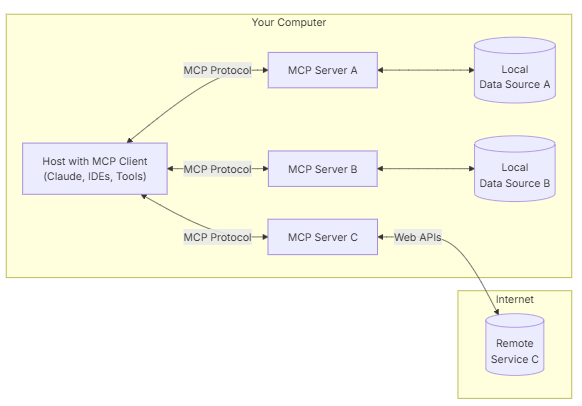 MCP Architecture
Core components
Protocol layer
Handles message framing, requests/response linking, and high level communication patterns.
Transport layer
Handles actual communication between clients and servers. Supports multiple transport mechanisms:
- STDIO transport: uses standard input/output
- HTTP with SSE transport:
- Uses Server-Sent Events for server-to-client messages.
- Uses HTTP POST for client-to-server messages.
All transports use JSON-RPC 2.0 to exchange messages. (remote-procedural call protocol)
⇒ Transport selection:
- For local communication: Studio transport (same-machine communication).
- For remote communication:
- use SSE for scenarios requiring HTTP compatibility (Ex: APIs).
- Consider security implications: authentication/authorization.
Message types
3 main types of messages:
- Requests: expect a response from the other side.
- Results: successful responses to requests.
- Errors: Indicate that a request failed
- Notifications: one-way messages that do not require a response.
Connection lifecycle
- Initialization:
- The client sends an initialization request with protocol version and capabilities.
- The server responds with its protocol version and capabilities.
- The client sends an initialized notification as an acknowledgement.
- Message exchange begins
- Message exchange:
- Follow patterns:
- Request-responses
- Notifications
- Follow patterns:
- Termination:
- Shutdown via close()
- Transport disconnection
- Error conditions
These concepts provide a basic understanding of how the protocol is structured and implemented.
As MCP provides SDKs for different programming languages, this post will not cover example code implementation. Example code snippets for basic use cases can be found on the official documentation: https://modelcontextprotocol.io/introduction
It has been very fun testing different MCP servers with my Claude Desktop Client, ranging from extracting and editing my local filesystems, to even remote resources like Notion databases and my GitHub. These all made me feel like the day I own a personal J.A.R.V.I.S like Iron Man is not too far away 😅.
Till then, I will keep trying my best to stay consistent on this learning journey 😁.
Bonus: In the case of developing MCP Servers, Claude Desktop can actually do a very good job, providing that it was given enough context (MCP SDK documentation - README file + documentation of applications / APIs for the MCP server implementation), plus some code review and testing from yourself (which the provided MCP Inspector could help): https://modelcontextprotocol.io/tutorials/building-mcp-with-llms